
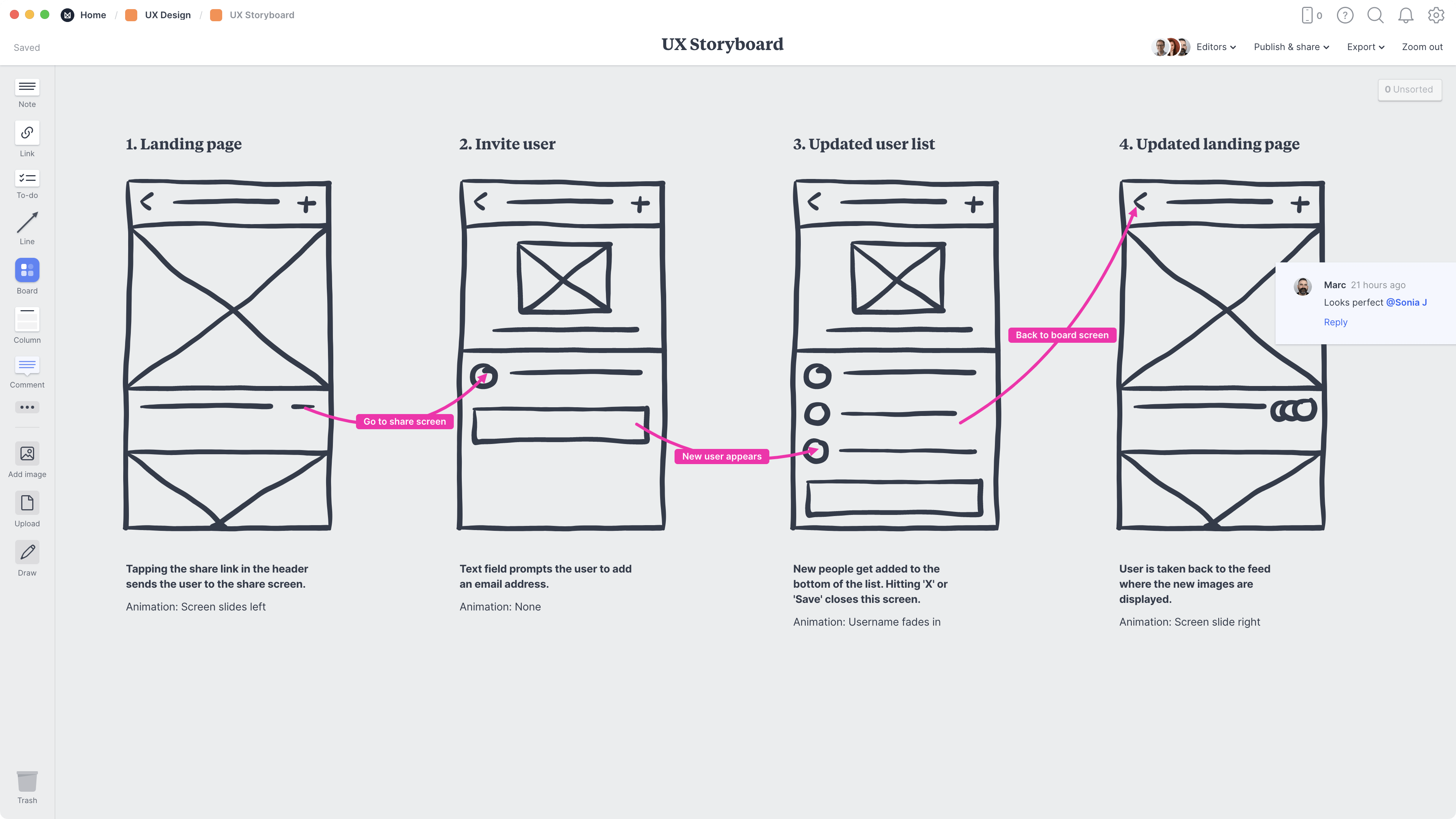
A UX storyboard is a visual sequence of illustrations or sketches that tells the story of a user’s experience with a product, service, or system

Image from Figma.
Storyboards are an essential visual narrative tool in design, translating a user’s complex workflow into a series of simple, connected panels that depict their actions and interactions over time.
Their main purpose is to help designers focus on the user, providing an understanding of their needs and motivations at every step.
This makes them a powerful communication tool for sharing a complex user flow in a relatable format across teams, and a crucial aid in the design process for visualizing ideas, planning research, and identifying key opportunities for enhancement early on.
Example shown in Figma website:

UX Storyboards have many uses. They are great for brainstorming because they show the user’s process step-by-step, helping designers quickly find confusing parts or missing features.
Before building anything complex, storyboards are used for user testing to get fast feedback and find the best flow for customers.
Instead of reading long reports, designers use them to visualize user research simply for the entire team.
They are essential for handoff, giving developers and other team members a clear understanding of the user’s journey and why certain design choices were made.
Leave a Reply